You wake up to find your X account locked. A message says suspicious activity was detected, and your posting privileges are suspended. For creators building an audience, this is one of the most disruptive challenges you can face, it halts your content calendar, freezes your growth momentum, and leaves you scrambling to regain access while your competitors keep posting.
Account locks triggered by suspicious activity flags happen more often than many creators realize, and they can derail weeks of consistent growth efforts. The good news: the unlock process doesn't have to be complicated. Understanding what triggered the lock and following the correct verification steps can get you back online in minutes, not days.[1] Our breakdown of How X Premium Unlocks Grok tackles the adjacent problem.
This article walks you through the fastest way to unlock your account, explains why these locks happen in the first place, and shows you how to prevent repeated locks that damage your long-term growth on the platform.
TL;DR
- X notifies you immediately when your account is locked due to suspicious activity, triggering a security review process.
- You can restore access by verifying your identity through email or phone verification, typically completed within minutes.
- Taking immediate action to unlock prevents escalation and further restrictions on your account functionality.[3]
Understanding X Account Locks for Suspicious Activity
What Is a Suspicious Activity Lock on X?
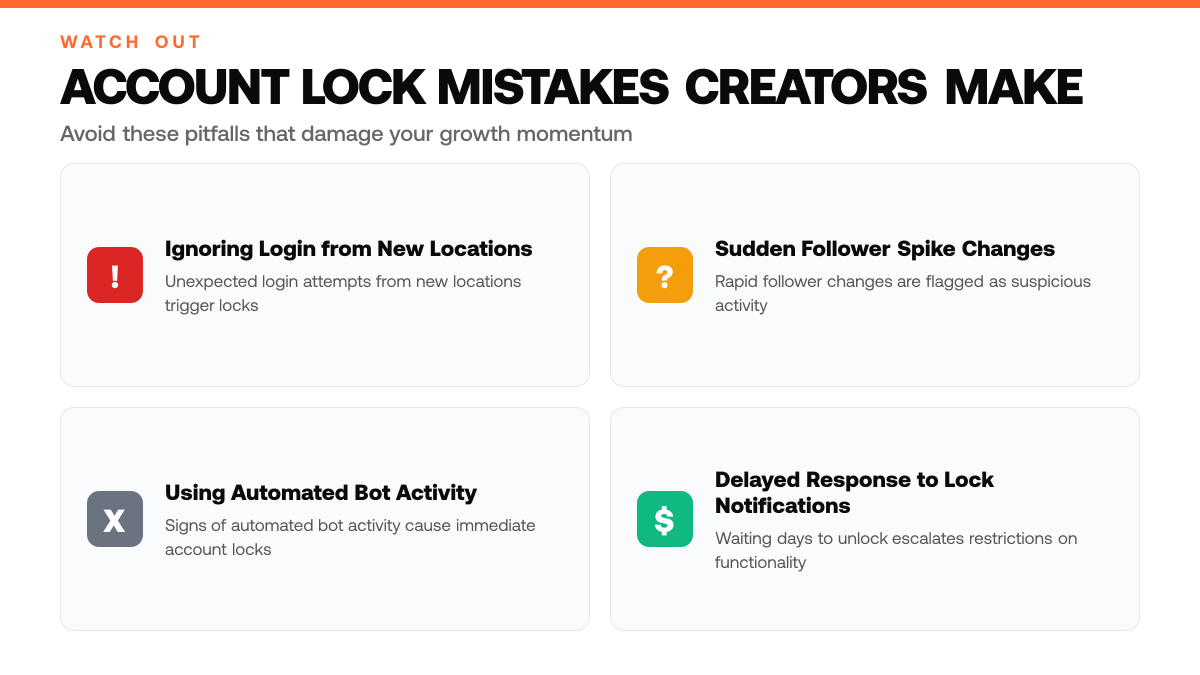
A suspicious activity lock is a temporary security measure X applies to accounts showing unusual behavior patterns. These locks trigger when the platform detects red flags like unexpected login attempts from new locations, sudden spikes in follower changes, or signs of automated bot activity. The lock prevents account access until you verify your identity, typically through email or phone confirmation. X implements these restrictions to protect your account from unauthorized access and maintain the integrity of the platform.[2]
Why X Prioritizes Security Over Convenience
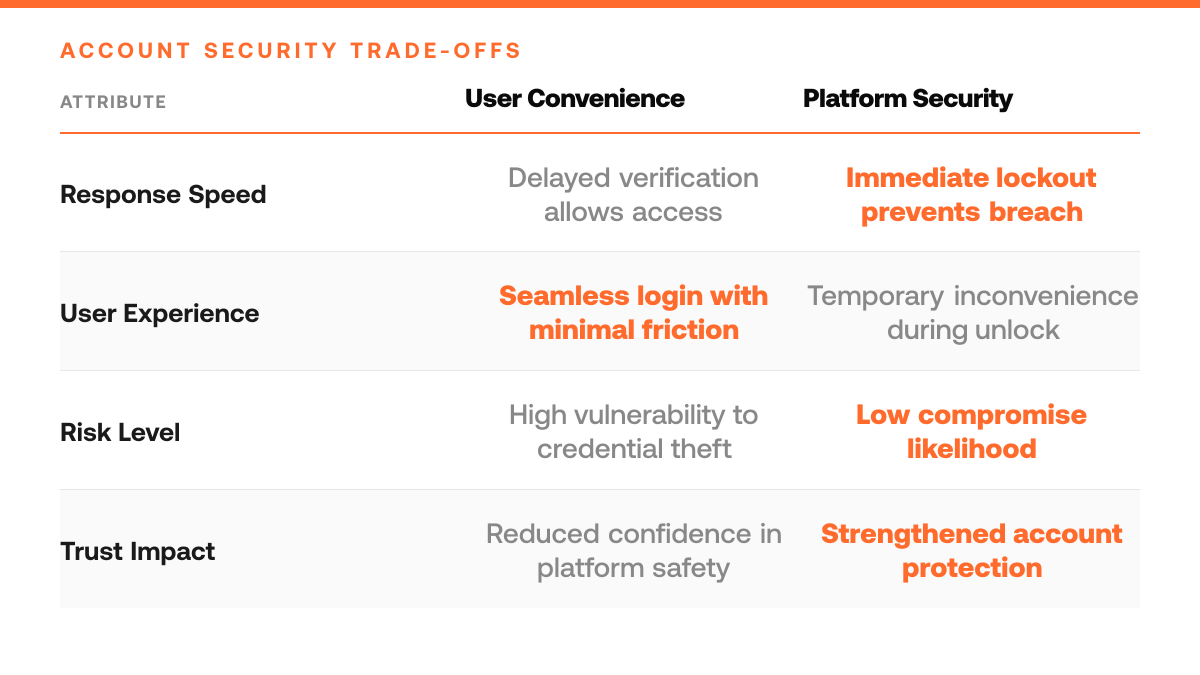
X's security system is designed to err on the side of caution, which means account locks can feel sudden and inconvenient, even when you haven't done anything wrong. The platform makes this trade-off deliberately: protecting your account from compromise is more important than avoiding friction during login. Phishing attempts and compromised credentials are the most common root causes of these locks. When X detects behavior that could indicate your password has been stolen or someone is trying to access your account, it locks you out immediately rather than waiting for confirmation, because the cost of a breached account far exceeds the cost of a temporary inconvenience.[2]
The Broader Context of Creator Account Security
For solo creators and solopreneurs building an audience on X, account security directly impacts your ability to grow followers and monetize your influence. A compromised account can be used to spread spam, damage your reputation, or lock you out of months of audience-building work. Understanding why these locks happen, and recognizing the warning signs of suspicious activity, helps you take preventive steps. The more you understand X's security logic, the faster you can respond when a lock occurs and the better you can protect your account going forward.
Step-by-Step Process
1. Identify the lock notification and access X's unlock portal
When X detects suspicious activity on your account, you'll receive a notification explaining the lock. Open that message immediately and look for a direct link to X's unlock portal. Click through to the portal, this is your entry point to the recovery process. Do not delay; the sooner you initiate the unlock sequence, the faster you can regain access to your account and resume posting to your audience.[4]
2. Verify your identity through email or phone verification code
X will prompt you to confirm your identity using either a verification code sent to your registered email address or a code texted to your phone number on file. Retrieve the code from your email inbox or text messages and enter it into the portal. This step ensures that only the legitimate account owner can unlock the account, protecting your audience and your monetization efforts from unauthorized access.[4]
3. Confirm account recovery details and reset your password
After verification, X will ask you to review and confirm your account recovery information, such as your registered email and phone number. Then create a new, strong password that differs significantly from any previous passwords. This reset prevents the suspicious activity from recurring and locks out any unauthorized access attempts, ensuring your account remains secure as you rebuild your follower base and impressions.[4]
4. Review your login activity and enable two-factor authentication
Once unlocked, check your account's login history to spot any unfamiliar access points. Then activate two-factor authentication (2FA) on your account settings. This extra security layer requires a second verification step whenever someone tries to log in, making it significantly harder for bad actors to lock you out again and keeping your audience engagement and monetization stream uninterrupted.[4]
How This Works in Practice
Example 1: The Creator Logging In From a New Device
Picture a creator who's been building a modest following on X over several months, posting consistently and engaging with their audience. One evening, they try to log in from a new laptop while traveling, something they didn't do before without notifying the platform. X detects this unusual access pattern and immediately locks the account, flagging it as a potential security breach. The creator sees a notification: "Suspicious activity detected. Unlock in 5 minutes." They verify their identity through email or phone, and within moments, the lock lifts. The account remains intact, their followers untouched, and they're back to posting. This friction is intentional, X prioritizes account safety over seamless login, knowing that a few seconds of verification prevents far worse outcomes like credential theft or bot takeover.
Do and Don't: Account Lock Response
| Do This | Don't Do This |
|---|---|
| Open the unlock notification immediately and click the portal link | Delay action or ignore the lock message hoping it resolves itself |
| Verify your identity through email or phone code as prompted | Attempt to log in repeatedly or use alternative access methods |
| Take preventive steps to protect your account going forward | Resume normal posting without understanding what triggered the lock |
| Recognize warning signs like unexpected login attempts from new locations | Ignore unusual behavior patterns or sudden follower changes on your account |
Example 2: The Rapid Growth From Engagement Pods
Imagine a solopreneur who joins an engagement pod, a private group where members agree to like and retweet each other's posts to artificially inflate metrics. Within days, their follower count spikes noticeably, and their engagement numbers look impressive. But X's algorithms detect the pattern: the same accounts are interacting with their posts in lockstep, the timing is mechanical, and the behavior doesn't match organic audience growth. The platform flags this as automated activity and locks the account. The creator receives the same 5-minute unlock prompt, but this time it's a warning. They verify identity, regain access, and realize the pod strategy backfired. The lock served its purpose, stopping what X considers artificial inflation before it escalated to permanent suspension.
Why Speed Matters for Trust
Both scenarios show that X's 5-minute lock is a speed bump, not a dead end. The platform assumes good faith: verify quickly, and you're back to building. The lock itself is the signal, it tells you X is watching for account compromise, bot networks, and artificial growth tactics. Creators who take these locks seriously (reviewing their login habits, auditing their engagement sources, strengthening their passwords across platforms) turn friction into a security habit that protects their audience and their monetization prospects long-term.
Account Security Checklist
- Update your email address and phone number in X account settings to ensure recovery options are current
- Enable two-factor authentication on your X account to block unauthorized login attempts
- Review active sessions in your X security dashboard and sign out from any unrecognized devices
- Change your X password immediately if you suspect suspicious activity on your account
- Check your X login history for unfamiliar locations or devices accessing your account
Common Mistakes to Avoid
Mistake: Ignoring early warning signs like unusual login alerts before a full account lock
Many creators dismiss suspicious login notifications as false alarms and continue posting without investigating. By the time a full lock occurs, the account is already flagged by X's security system. The fix: act immediately on any unusual login alert. Change your password, review active sessions, and check for compromised credentials. Early intervention prevents escalation to a complete account suspension.
Why X Locks Accounts: Root Causes and Prevention
| Red Flag Behavior | Prevention Strategy |
|---|---|
| Unexpected login attempts from new locations | Monitor your login activity and use strong, unique passwords |
| Sudden spikes in follower changes or bot-like activity | Maintain consistent, authentic engagement with your audience |
| Signs of automated bot activity or compromised credentials | Avoid third-party tools that violate platform terms and enable two-factor authentication |
| Phishing attempts or password theft indicators | Never share credentials and verify sender identity before clicking links |
Mistake: Using automation tools without understanding X's bot detection rules
Creators often rely on scheduling, engagement, or growth tools without learning X's automation limits and detection thresholds. This increases the risk of triggering suspicious activity locks. The fix: research any third-party tool's compliance with X's API policies before use. Understand rate limits, avoid bulk actions, and prefer native X features when possible. Tools like ClimbX are designed with X's rules in mind, reducing lock risk.
Mistake: Attempting to unlock your account multiple times in rapid succession
Creators panic and repeatedly submit unlock requests or try different recovery methods within minutes, which signals further suspicious behavior to X's system. Each failed attempt can extend the lock period and damage your account's trust score. The fix: submit one unlock request, then wait. Follow X's official recovery process step-by-step and allow time for review before trying again. Patience reduces the risk of a longer lockout.
Frequently Asked Questions
Is an X account lock the same as a permanent ban?
No. Account locks are temporary security measures that resolve within minutes to hours, not permanent bans. X implements locks to protect your account from suspicious activity and prevent unauthorized access. Once you verify your identity and complete the unlock process, your account regains full functionality. Understanding this distinction helps you respond calmly and take the right steps to restore access quickly.[1]
Do I need to pay X or use a third-party service to unlock my account?
No. X does not require payment or third-party services to unlock an account. The unlock process is free and handled directly through X's verification system. Be cautious of any service claiming to unlock accounts for a fee, these are scams. Stick to X's official unlock flow, which typically involves confirming your email, phone, or solving a CAPTCHA.[1]
What does it mean if my account gets locked repeatedly?
Repeated locks signal a deeper security issue that requires immediate action. This pattern suggests your password may be compromised or your device has been exposed to malware. Reset your password to a strong, unique credential, audit your connected devices and apps with access to your account, and check your email for unauthorized login attempts. If locks persist after these steps, contact X support for additional guidance.[1]
Sources
Try the loop on your own cohort.
Pick three accounts you would like to be at in 12 months. ClimbX pulls their recent outliers, tags them, and drafts in your voice off what is currently working. Edit, ship, watch the loop tighten.
Read next
- 5 Essential Social Media Account Security Tips for 2026 - 5 Essential Social Media Account Security Tips for 2026. A practical guide to what works, what to skip, and how to get started.
- Sprout Social Pricing 2026: What You'll Actually Pay - Sprout Social Pricing 2026: What You'll Actually Pay. A practical guide to what works, what to skip, and how to get started.
- Best Typefully Alternatives in 2026 - Compare current Typefully alternatives for X research, AI drafting, scheduling, automation, analytics, and multi-network publishing.