A creator's social media account is more than a profile, it's a direct pipeline to an audience and a source of income. When a hacker gains access, they don't just steal a password; they seize control of your reach, your credibility, and your earnings potential. For solo creators and solopreneurs building influence on social platforms, account compromise represents one of the most immediate threats to growth and monetization.
Compromised accounts can result in rapid follower loss, permanent damage to brand reputation, and disruption to creator income streams that may have taken months or years to establish. The stakes are particularly high for creators who depend on consistent audience engagement and platform presence to sustain their business. Understanding why your account is valuable to attackers is the first step toward protecting it.[1]
This article covers five essential security practices designed to help you safeguard your account, maintain audience trust, and keep your income channels secure. These strategies address the most common vulnerabilities that put creator accounts at risk and provide actionable steps you can implement immediately to strengthen your defenses. Most creators secure their accounts but still bleed followers to accounts posting similar ideas because they can't tell what format or hook actually moves their audience, ClimbX analyzes your top-performing posts and scans winning outliers in your niche to feed your AI co-writer the exact signals that compound growth.
TL;DR
- Enable two-factor authentication and use a password manager with strong, unique passwords to block unauthorized access at the entry point.
- Review third-party app permissions regularly and set up account recovery options so you can regain control if compromised.
- Monitor login activity and suspicious sign-ins to catch threats early before attackers cause damage to your audience and monetization.
Understanding Social Media Account Security
What Is Social Media Account Security?
Social media account security refers to the protective measures and practices you implement to safeguard your online presence from unauthorized access and compromise. At its core, it involves layering defenses, starting with strong passwords and extending to verification methods that confirm your identity before allowing login. Two-factor authentication creates a second verification barrier that prevents unauthorized login even if a password is compromised, requiring a second form of proof beyond your password alone. Password managers generate and store complex passwords securely, eliminating the need to remember or reuse passwords across platforms. Together, these tools and practices form a comprehensive shield against attackers who target creator accounts for credential theft, impersonation, and content hijacking.[2]
Why Social Media Security Matters for Creators
For solo creators and solopreneurs building an audience, your social media accounts are business assets. A compromised account can result in lost followers, damaged credibility, stolen content, and disrupted monetization efforts. Attackers specifically target creator accounts because they offer visibility, follower lists, and monetization features, making them valuable targets. The stakes are higher than a casual user's account because your reputation and income depend on maintaining control and trust with your audience. Implementing security fundamentals protects not just your account, but the relationships and revenue streams you've worked to build.
The Evolving Threat Landscape for Social Platforms
Social media platforms face increasingly sophisticated attack methods, from phishing campaigns to credential stuffing and malware distribution. Creators are frequent targets because their accounts command large audiences and often have monetization enabled. The threat environment continues to shift, with attackers adapting tactics to exploit human behavior and platform vulnerabilities. Understanding this landscape underscores why reactive security, waiting until after a breach, is insufficient. Proactive security practices, applied consistently across your accounts, reduce your exposure and keep your audience and earnings protected.
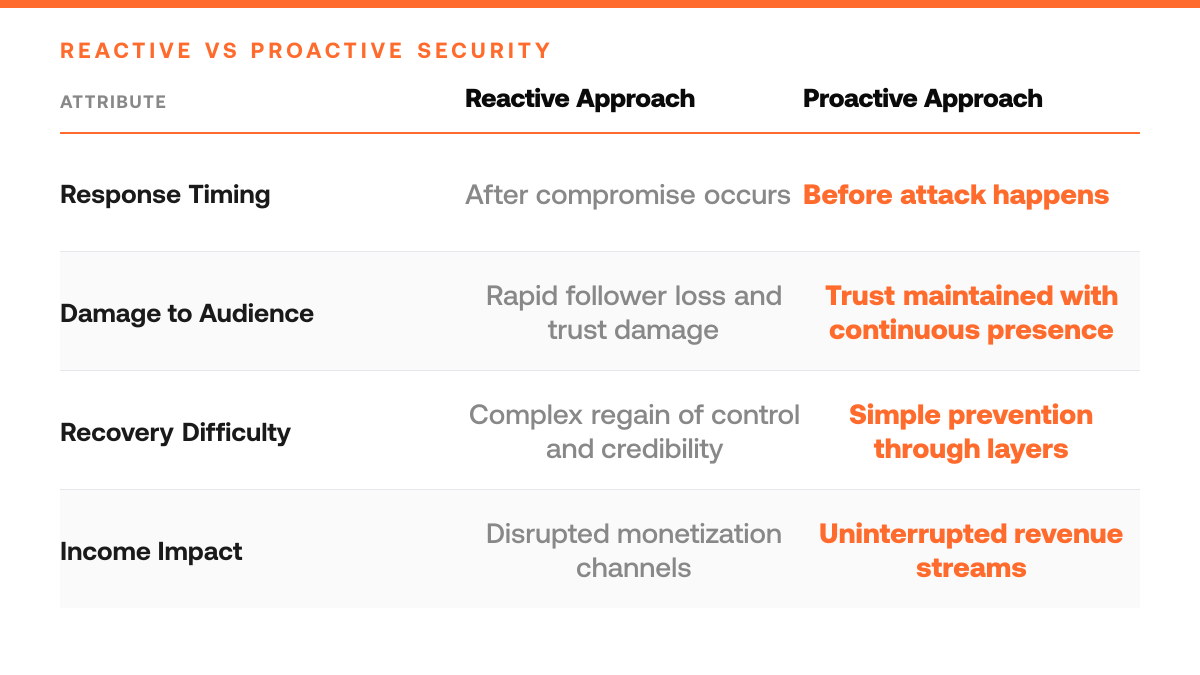
Key Numbers for Social Media Account Security (2026)
Step-by-Step Process
1. Enable two-factor authentication on all accounts
Navigate to your account security settings on each social platform you use. Locate the two-factor authentication (2FA) option and activate it. Choose an authentication method, most platforms offer app-based codes (like Google Authenticator or Authy), SMS text messages, or security keys. App-based methods are generally more secure than SMS. Complete the setup process and save your backup codes in a secure location. This creates a second verification step beyond your password, making unauthorized access significantly harder.[4]
2. Review connected third-party applications
Go to your account settings and find the section for connected apps or authorized applications. This area shows every third-party tool that has access to your account. Examine each one carefully and ask yourself: Do I still use this tool? Does it need this level of access? Remove any apps you no longer actively use or that you don't recognize. Revoking access prevents dormant applications from becoming vectors for token hijacking, where attackers exploit old credentials to post unauthorized content or steal your account.[4]
3. Audit permissions for active third-party tools
For applications you do use regularly, check what permissions they have. Many tools request broad access when they only need limited functionality. Reduce permissions to the minimum required for the tool to work, for example, a scheduling app might need posting rights but not access to your direct messages. Review these permissions quarterly, as platforms sometimes update what third-party apps can do. Tighter permissions reduce the blast radius if a tool's servers are compromised.[4]
4. Rotate your password and update recovery information
Change your social media passwords to strong, unique combinations that you don't use elsewhere. Use a password manager to generate and store these securely. Update your recovery email address and phone number to accounts you actively monitor and control. This ensures that if someone attempts to reset your password or regain access, you'll receive the notification and can block the attempt. A strong password combined with current recovery details blocks most common account takeover attempts.
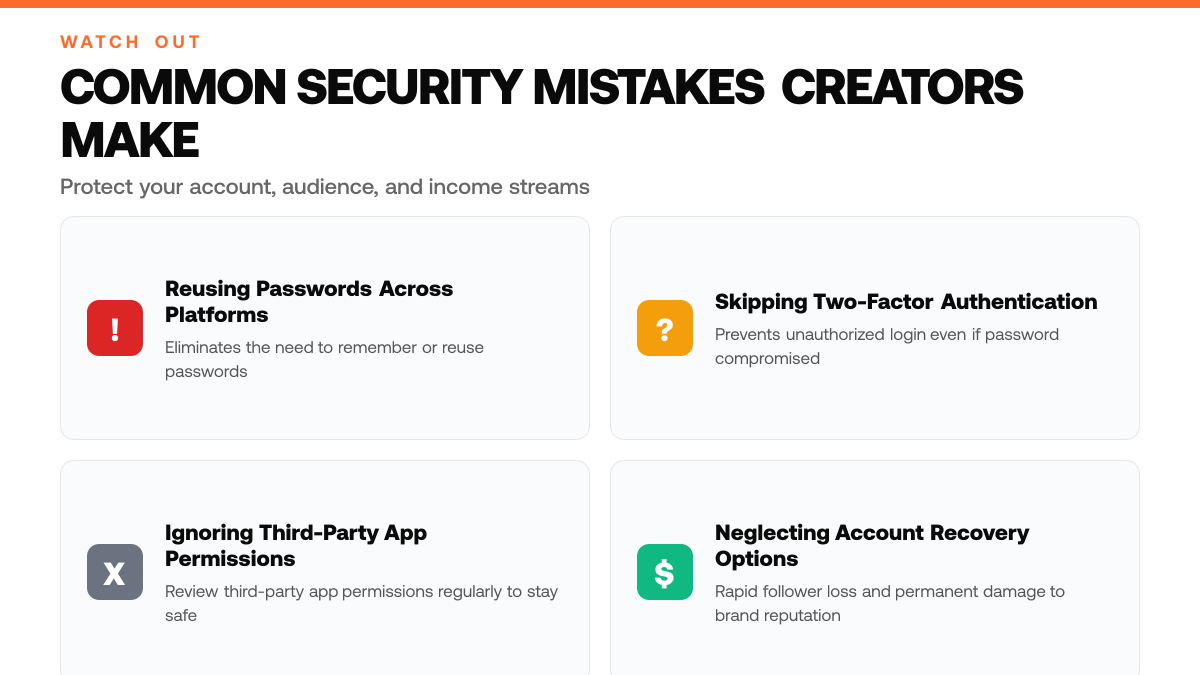
How This Works in Practice
Example 1: The Creator Who Fell for a Phishing Link
Picture a solo creator who's been growing a following over several months and suddenly receives an email that looks like it's from X support, warning about unusual login activity. The creator clicks the link, enters their credentials, and within hours discovers their account is posting spam and cryptocurrency scams to their entire audience. The attacker had exploited a simple phishing email, one that mimicked X's branding perfectly. The creator's followers see malicious content, trust erodes quickly, and the account takes weeks to recover. This scenario unfolds because the creator never verified the sender's email address or checked for subtle domain misspellings. A single moment of inattention turned months of audience-building into a liability, and the creator had to publicly apologize and rebuild credibility from scratch.
Account Security Do's and Don'ts
| Security Practice | Do | Don't |
|---|---|---|
| Password Management | Use a password manager to generate and store complex, unique passwords | Reuse passwords across platforms or rely on memory |
| Two-Factor Authentication | Enable two-factor authentication as a second verification barrier | Skip verification methods that confirm identity before login |
| Third-Party App Access | Review third-party app permissions regularly and revoke unnecessary access | Grant broad permissions without auditing what apps can access |
| Account Recovery | Set up account recovery options in advance to regain control if compromised | Wait until after compromise to establish recovery methods |
| Login Monitoring | Monitor login activity and suspicious sign-ins to catch threats early | Ignore unusual account access patterns or unfamiliar devices |
Example 2: The Solopreneur Who Granted Too Many App Permissions
Imagine a solopreneur who uses a scheduling tool to post content consistently across X. During setup, the app requests permission to access the account, and the creator approves without reading the fine print, granting not just posting rights, but also access to direct messages and follower lists. Months later, the creator notices unfamiliar tweets posted at odd hours and discovers the app's security was breached. The attacker used the overly broad permissions to impersonate the creator, post misleading content, and harvest contact information from the creator's audience. The damage extends beyond the account itself: followers feel violated, engagement drops, and the creator spends weeks auditing which apps still have access. This scenario shows how convenience, clicking 'approve' without scrutiny, can hand attackers a master key to your entire presence.
Why Vigilance Protects Your Audience
Both scenarios share a common thread: account compromise doesn't just harm the creator, it weaponizes their audience's trust. When phishing or unvetted app permissions lead to account takeover, the attacker uses your credibility to spread malicious content, impersonate you, and erode the relationship you've spent months building. Protecting your account is protecting your audience and your long-term growth.
Social Media Account Security Checklist
- Enable two-factor authentication on your X account and verify the recovery codes are stored securely offline.
- Review all connected third-party apps with access to your X account and revoke permissions for any tools you no longer actively use.
- Audit your login activity history in X settings to identify any unrecognized sign-ins or suspicious access patterns.
- Update your X password to a unique, complex combination and confirm no other accounts share the same credentials.
Common Mistakes to Avoid
Mistake: Using the same password across multiple social media accounts
When creators reuse passwords, a single breach on one platform instantly compromises every account that shares that credential. An attacker gains access to your X profile, email, payment methods, and audience trust simultaneously. Fix this by generating unique, complex passwords for each platform, use a password manager to store them securely and rotate them periodically.[3]
Casual User vs Creator Account Security Needs
| Security Concern | Casual User Impact | Creator Account Impact |
|---|---|---|
| Account Compromise | Loss of personal data and privacy | Lost followers, damaged credibility, disrupted monetization |
| Unauthorized Access | Limited to account theft or impersonation | Content hijacking, audience manipulation, income stream disruption |
| Recovery Timeline | Can rebuild account gradually | Immediate threat to business relationships and revenue |
| Attacker Motivation | Generic credential theft or spam | Access to visibility, follower lists, and monetization features |
Mistake: Dismissing suspicious login notifications or delaying security updates
Ignoring alerts about unfamiliar login attempts or postponing software patches leaves your account vulnerable to active exploitation. Attackers often test access before launching a full takeover, and outdated apps contain known security holes they can exploit. Immediately investigate any unusual activity, enable two-factor authentication, and install updates as soon as they're available, don't wait.[3]
Mistake: Storing sensitive account recovery information in plain text or shared documents
Backup codes, security questions, and recovery email addresses left in unencrypted notes or cloud files become entry points for attackers. If someone gains access to your computer or shared workspace, they can reset your password and lock you out permanently. Keep recovery details in a dedicated password manager with encryption, and never share them in emails or messaging apps.[3]
Frequently Asked Questions
What should I do if my account is already compromised?
If your account is compromised, immediately change your password from a secure device and enable two-factor authentication if you haven't already. Contact the platform's support team to report the breach and review your account activity for unauthorized posts or changes. Check linked email addresses and recovery options to ensure attackers haven't locked you out further. Document any suspicious activity and consider a full security audit of connected accounts and devices.
Can I recover access to a hacked account?
Yes, most platforms offer account recovery options through verified email addresses, phone numbers, or identity verification. The process varies by platform but typically involves proving ownership through a recovery email or authenticator. Act quickly, the sooner you report the breach, the better your chances of regaining control before attackers change critical recovery details. Keep backup recovery codes in a secure location to speed up this process if needed.
How do security tools help creators grow without risking their accounts?
Security tools like the right tool protect your account while you focus on content strategy and audience growth. By automating content analysis and scheduling, these tools reduce manual access points where credentials might be exposed. A purpose-built platform analyzes your highest-performing formats and topics, then helps draft posts in your authentic voice paired with analytics, letting you scale content strategy without juggling multiple logins or third-party apps that require account permissions.
Start your 7-day trial
Grow on X without sounding like everyone else. This approach learns from your top posts and the leading voices in your niche, then drafts content in your voice. You edit, approve, and ship.
Start free trialSources
Read next
- AI Social Media Tools for Solo Creators (2026) - AI Social Media Tools for Solo Creators (2026). A practical guide to what works, what to skip, and how to get started.
- Best Twitter Analytics Monitoring Tools in 2026 - Best Twitter Analytics Monitoring Tools in 2026. A practical guide to what works, what to skip, and how to get started.
- The Complete Guide to Finding Content Ideas That Actually Convert - The Complete Guide to Finding Content Ideas That Actually Convert. A practical guide to what works, what to skip, and how to get started.