
The short version
On the web, open Settings and privacy, then Privacy and safety, then Content you see to review sensitive-media viewing controls. Search has its own filtering setting. The setting for labeling media you publish is separate, and viewing preferences do not override age restrictions.
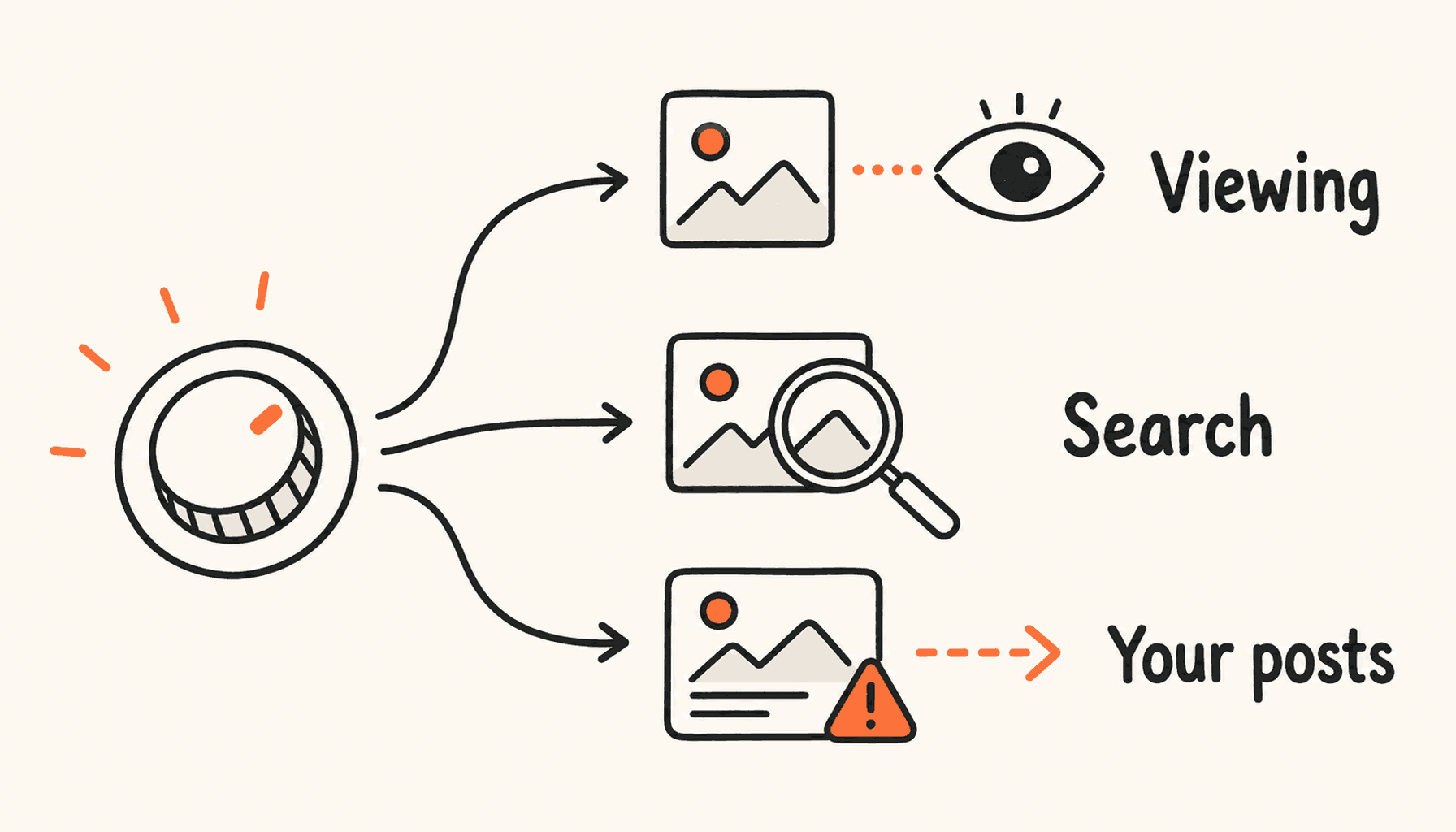
X has separate controls for what you view, what search hides, and how your own media is labeled. To change sensitive content settings on X, first work out which one you need. That way you do not change how your posts are labeled when the real problem is a search filter or an account restriction.
Choose the next step
| Your task | Start here |
|---|---|
| Change what you view | Review Content you see under Privacy and safety. |
| Filter search results | Review Search settings and sensitive-content filtering. |
| Label media you publish | Review Your posts and the media-label setting. |
| Content still unavailable | Check the notice and any age-verification requirement. |
Start with the setting that matches the problem
If you want to control your feed, start with viewing preferences. If the problem only shows up in search, check the search filter. If your own uploads need a warning, use the posting controls. Changing one will not fix another.
Use the web version at x.com when you follow X’s media-setting instructions. Labels and controls can differ between apps. Check that you are signed into the right account before you change anything.
Review viewing and search preferences
In Privacy and safety, open Content you see and check the sensitive-media preference. X’s safety guide describes one control for showing potentially sensitive media and a separate search setting for hiding it in search results. Pick the level of filtering you want.
After the change, go back to where the problem was: your feed or search. That shows you whether you changed the right setting, so you do not keep flipping unrelated toggles.
- Sign into the intended account on x.com.
- Open Settings and privacy, then Privacy and safety.
- Review Content you see for the viewing preference available to your account.
- Review Search settings separately if the problem occurs in search results.
- Return to the affected view and read any remaining notice before changing another setting.
Label your own media separately
X puts the account-wide media setting under Privacy and safety, then Your posts. It tells X that media you publish may need a sensitive-content label. It changes what you publish. It does not show you more content.
X can also add labels itself when media is mislabeled again and again. Read the notice on the account or post before you assume a label is a bug you can turn off in viewing preferences.
Three situations that need different fixes
Say a post shows in your feed but not in search. Start with the search filter and the search you ran. A missing result does not mean the account’s publishing label is wrong.
If media you uploaded carries a warning, read the post or account notice and check your setting for media you post. A viewing preference only changes what you see. It does not remove the warning for other readers.
If the message is about an age restriction, follow X’s age process. A generic checklist of toggles ignores what X has already told you.
| Situation | Relevant path | What it will not establish |
|---|---|---|
| Search hides some media | Search filtering and the exact query. | That the original post was deleted. |
| Your upload carries a warning | Publishing label and any enforcement notice. | That changing your viewing preferences removes the label. |
| The notice concerns age | Official age-assurance process. | That a display toggle overrides eligibility. |
Understand why a viewing preference may not be enough
X restricts marked adult content for viewers under 18 and for viewers without a birth date on their profile. Its age-assurance process can also limit access. A settings toggle does not lift those limits.
If X got your age wrong, use its official support or challenge process. Follow the information request shown on your account. Changing other settings or reinstalling the app will not prove your age.
Troubleshoot with the exact notice
Write down what you see: a warning you can click through, media that will not load, or a notice on your account. Also note where it happens: the feed, search, or your own upload. Those details help support far more than “sensitive content is broken.”
For a team account, write down your posting rules. Anyone who changes the label on the account’s media should know what it normally posts and why the setting is on. Keep personal viewing preferences out of that decision.
For a clear support note, record the date, device, app or browser version if available, the menu you checked, and the exact notice. Describe one example. Do not send sensitive media or private account details you do not need to. That gives support something they can reproduce, not a list of settings you changed at random.
Once the viewing problem is fixed, look at your posting settings on their own. If you demo software, you usually need a clear example with private details hidden. You do not need to change every media setting on the account. Make the smallest change that fixes the real problem.
- Confirm the account and client you are using.
- Check the viewing control and search filter separately.
- Read any age or account notice before trying another setting.
- Use the official help route for a restriction you believe is incorrect.
Frequently asked questions
Why can I still not view some media after changing the setting?
Age restrictions and other account or content notices may still apply. Read the specific notice and follow X’s official process.
Does marking my own posts as sensitive change my feed?
That setting labels media you publish. Viewing preferences and search filters are separate controls.
Why does the guide’s menu look different from my app?
X’s interface and available controls can vary by client and account. Use the web instructions as a starting point and consult the current help page.
Plan the useful posts your account will publish
If you use X to explain your product work, ClimbX can help with research, drafting, and scheduling. Bring a concrete example, keep sensitive details out of it, and review the post before it goes live.
Read next
- How to Use X (Twitter) in 2026: A Complete Beginner's Guide - Learn how to use X in 2026, from account setup and posting to replies, safety, analytics, and a practical first 30-day plan.
- X Advanced Search Operators: A Practical 2026 Guide - Use current X advanced search operators to find customers, conversations, competitor posts, evidence and content ideas, with example query patterns to adapt and check.
Sources
- X digital safety playbook - Viewing preferences and search filtering.
- Media settings - Labeling the media an account publishes.
- Account notices - Age-restricted content and account notices.
- Age assurance - Age checks and the route to challenge an incorrect estimate.