

The short version
ClimbX vs Buffer comes down to how many networks you post to. Pick Buffer if you post to X plus LinkedIn, Instagram or TikTok, share links, or want a free plan. It costs $6 a month per channel, or $5 billed yearly.
Pick ClimbX if X is where you grow and your problem is what to post, not where to queue it. It is $29 a month for one X account. Prices checked November 8, 2026.
- $6
- Buffer Essentials, per channel a month
- $29
- ClimbX Base, one X account a month
- 11
- Networks Buffer publishes to
- 1
- Network ClimbX covers: X
Quick note: ClimbX is our product. Every Buffer fact here comes from Buffer’s own pricing page and developer docs, linked at the bottom.
What is the real difference?
Buffer is a scheduler for many networks. ClimbX is a growth tool for one network, X.
Buffer starts from a post you already have. You write it, pick your channels and drop it in the queue. ClimbX starts one step earlier. It hands you drafts in your voice each morning, scores them, and points you to posts worth replying to.
- 1Find what to postClimbX: Ready Posts, Inspiration
- 2Write it like youClimbX: Cliff. Buffer: AI Assistant
- 3Check it before it goesClimbX: draft score and one fix
- 4Queue it everywhereBuffer: 11 networks. ClimbX: X only
If you already have more posts than slots, Buffer saves you time for a few dollars. If you open X and stare at an empty box, a cheaper queue will not help.
How do ClimbX and Buffer compare?
Buffer wins on reach across networks and price. ClimbX wins on help with X.
| Question | Buffer | ClimbX |
|---|---|---|
| Networks | X, LinkedIn, Instagram, Facebook, TikTok, YouTube, Threads, Bluesky and more | X only |
| Entry price | Free for 3 channels; $6/mo per channel, $5 billed yearly | $29/mo for one X account, 7-day trial |
| Where ideas come from | You, plus templates and an ideas board | Ready Posts: fresh drafts every day from your posts and what works for accounts your size |
| AI writing | AI Assistant to create, refine and repurpose | Cliff, a chat co-writer that drafts in your voice |
| Check before posting | No draft score listed on its pricing page | A score for every draft, with one clear fix |
| Replies | Inbox for comments on your own posts, with AI reply suggestions | Engage: fresh posts in your niche worth replying to; you edit and send |
| Analytics | Insights; 30-day history on Free, unlimited on paid | Analytics plus Learnings that feed your next drafts |
| Links | Scheduled and shortened | Blocked from scheduling; post them yourself |
| Teams | Unlimited users and approvals on Team | Up to 10 X accounts on Agency |
| AI chat (MCP) | Yes: list, create, edit, delete posts | Yes: OAuth, write access opt-in, 8 posts a day, no links |
Buffer from Buffer pricing and its MCP docs, checked November 8, 2026. ClimbX from ClimbX pricing and the developer docs.
What does each cost for one X account?
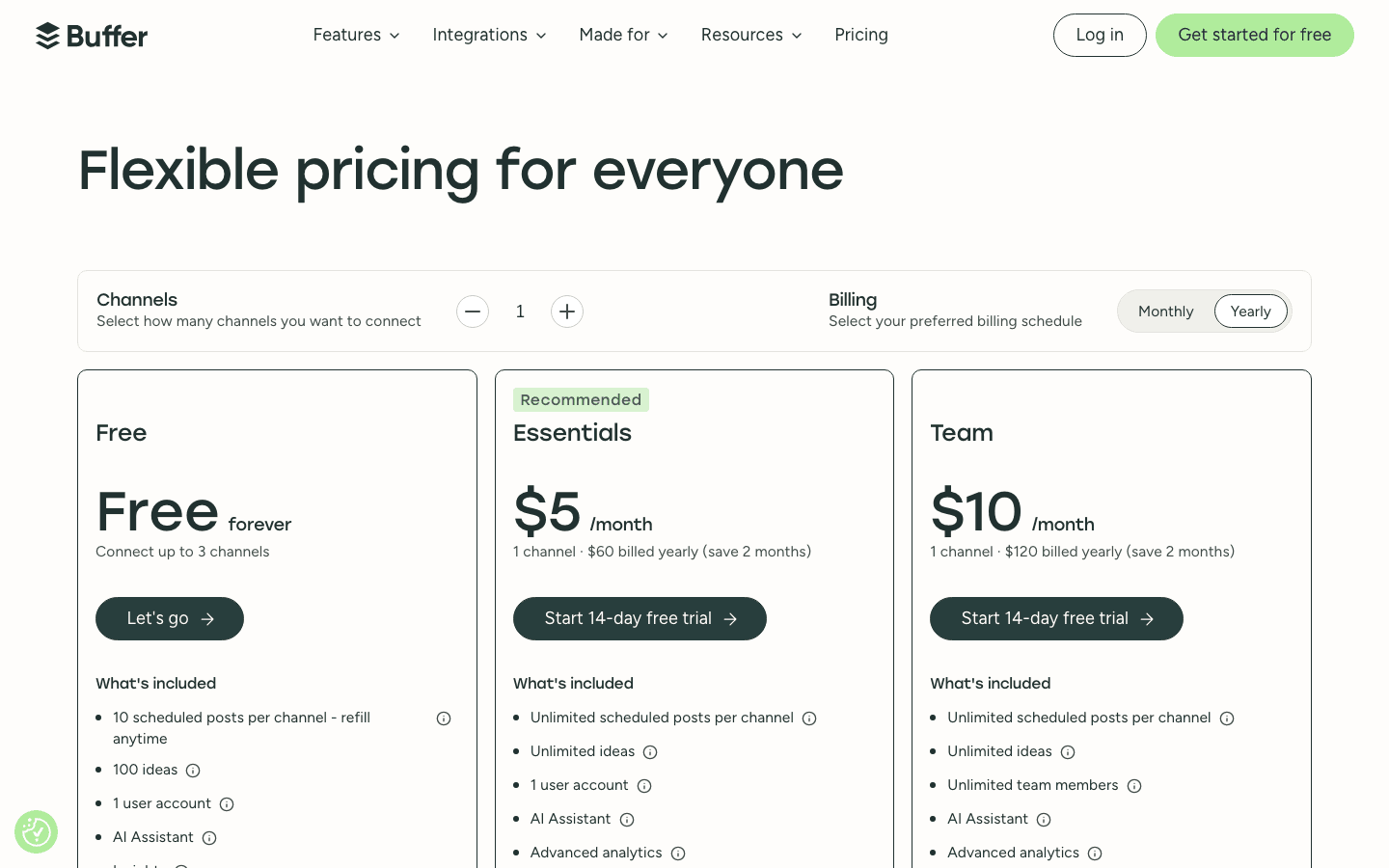
For one X account, Buffer is about a fifth of the price of ClimbX. Buffer charges per channel. One X account is one channel.
| Buffer plan | Monthly billing | Yearly billing | Key limits |
|---|---|---|---|
| Free | $0 | $0 | 3 channels, 10 scheduled posts per channel, 1 threaded post |
| Essentials | $6 per channel | $5 per channel ($60/yr) | 1 user, unlimited posts |
| Team | $12 per channel | $10 per channel ($120/yr) | Unlimited users, approval workflows |
From Buffer pricing and its machine-readable price list, checked November 8, 2026. Paid plans start with a 14-day trial. Channels 11 and up cost less per channel.
ClimbX has three plans. Base is $29 a month for one X account. Pro is $29 at the founding price (list $39) for 3 X accounts, the 60-day growth plan, auto-plug and auto-retweet. Agency is $199 for 10 X accounts. There is no free plan.
- ClimbX Base$29
- Buffer Team$12
- Buffer Essentials$6
- Buffer Essentials, yearly$5
- Buffer Free$0 · 10 posts queued at a time
So the real question is whether the $23 gap buys you posts you would not have written. If you already write daily, it does not.
Where Buffer is the better choice
Buffer is the better pick for anyone who posts beyond X.
Pick Buffer if
- You post to LinkedIn, Instagram, TikTok or YouTube as well as X.
- You share links often. Buffer schedules and shortens them.
- You want to start free. Buffer’s free plan covers 3 channels.
- A team needs approvals. Buffer Team has approval workflows and access levels.
- You want an AI agent to post a lot. Buffer limits API requests, not posts. ClimbX caps API and MCP posts at 8 a day.
Buffer is less of a fit if
- You run out of things to post. Buffer queues what you give it.
- You want help finding other people’s posts to reply to. Buffer’s inbox covers comments on your own posts.
- You only post to X and want the tool built around it.
ClimbX’s limits are worth saying plainly. It is X only. It blocks scheduling any post with a link. Its API and MCP allow 8 posts per day, with up to 4 images and no video yet. X charges apps $0.015 a post and $0.200 a post with a link. Our X API limits post explains why that shapes what tools allow.
Why block links? Across my 1,230 original posts, the 90 with a link reached 0.59x my median. Buffer leaves that call to you.
Where ClimbX fits instead
ClimbX fits if X is your growth channel and you want help every day.
Ready Posts. Each morning you get a fresh batch of drafts in your voice. They come from your own post history and from formats that work for accounts your size. You edit the ones you like and schedule them.
A score before you post. Every draft gets a score and one clear fix. You see it before the post goes out, not a week later in analytics.
Engage. A feed of fresh posts in your niche worth replying to while they still have reach. ClimbX can draft a reply. You edit it and send it yourself. It never likes, follows or DMs for you, and never replies to other people for you. Why that matters on X right now is in will AI replies get you banned on X.
Learnings. ClimbX tracks which of your posts earn replies and reach. Your next drafts use that.
A 60-day plan (Pro). Daily steps for posting and replying, kept inside safe limits: at most 5 posts and 30 replies a day.
Control from Claude or ChatGPT. Connect climbx.so/mcp and ask for your Ready Posts, your scheduled posts or how last week went. Scheduling needs the extra write permission. Setup is in the developer docs. To test whether any AI writer sounds like you before you pay, use the checks in AI tweet writer in your voice.
Can you use both?
Yes. Buffer for your other networks, ClimbX for X. Just give your X queue to one tool.
Say you post daily on X and twice a week on LinkedIn and Instagram. Buffer Essentials for those two channels is $12 a month on monthly billing. ClimbX Base for X is $29. That is $41 a month for both. Never schedule the same X post from both tools, or it goes out twice. Our guide to scheduling posts and threads on X shows how to keep one clean queue.
Comparing more schedulers first? Our Buffer alternatives for X post prices five of them. For what X allows a tool to automate, read Twitter automation rules.
How to decide in one week
Write down what stopped you posting last week. That answer picks the tool.
A one-week test
- Day 1: count your X posts last week and write down why there were not more.
- If the answer is “other networks”, “links” or “my team”: start on Buffer’s free plan.
- If the answer is “no ideas” or “it did not sound like me”: start a ClimbX trial.
- Days 2 to 6: schedule at least three real posts in the tool you picked.
- Day 7: keep the tool that gave you posts you would sign without heavy edits.
Still between X-first tools? See ClimbX vs Typefully.
Frequently asked questions
Is ClimbX cheaper than Buffer?
No. Buffer is cheaper for scheduling. Buffer Essentials is $6 a month for one channel, or $5 billed yearly, and Buffer has a free plan. ClimbX Base is $29 a month for one X account with a 7-day trial and no free plan. The $29 pays for drafting, scoring and reply finding on X, not for a cheaper queue.
Does Buffer work for X (Twitter)?
Yes. Buffer publishes posts and threads to X automatically, on every plan. The free plan allows 10 scheduled posts per channel at a time and 1 threaded post. Paid plans remove those limits.
Does Buffer have an AI assistant?
Yes. Buffer’s AI Assistant is on every plan, including Free, for creating, refining and repurposing posts. Buffer also lists AI replies to comments that learn your voice: 5 suggestions a week on Free, unlimited on paid plans.
Can I post links with ClimbX?
Not on a schedule. ClimbX blocks scheduled posts and API posts that contain a link, because link posts reach fewer people on X. You can still post a link yourself with the Post button, which opens X. If you share a lot of links, Buffer handles them and shortens them for you.
Can Claude or ChatGPT schedule posts through Buffer or ClimbX?
Both have an MCP server. Buffer's can list, create, edit and delete posts on any of its networks. ClimbX's connects with OAuth at climbx.so/mcp and needs a separate write permission before it can schedule or publish. ClimbX allows 8 posts a day through the API and MCP, and no links.
Should I use ClimbX and Buffer together?
It works well if you post to X plus other networks. Keep Buffer for LinkedIn or Instagram and let ClimbX own your X queue. Do not schedule the same X post from both tools.
Buffer queues your posts. ClimbX helps you write them.
Drafts in your voice every morning, a score before you post, and a feed of posts worth replying to. X only, and you approve everything.
Read next
- Buffer Alternatives for X (and Metricool Alternatives) in 2026 - Buffer and Metricool alternatives for people who mainly post on X: Typefully, Publer, Postiz, SocialBee and ClimbX, with real prices and what each one costs for one X account.
- AI Tweet Writer That Sounds Like You: How to Test One Before You Pay - Most AI tweet writers sound like everyone else. What a real voice profile measures, a blind test you can run in ten minutes, and the red flags that mean a tool will not learn you.
Sources
- Buffer pricing - Free for 3 channels with 10 scheduled posts each; Essentials $5 and Team $10 per channel a month billed yearly; 14-day trial; X channel feature table. Checked November 8, 2026.
- Buffer pricing (machine-readable) - Monthly rates: Essentials $6 and Team $12 per channel for channels 1 to 10. Checked November 8, 2026.
- Buffer developer docs: MCP server - Tools to list, create, edit and delete posts; supported networks; rate limits. Checked November 8, 2026.
- Buffer on X: MCP announcement - Posted October 19, 2026.
- ClimbX pricing - Base $29, Pro $29 founding price (list $39), Agency $199.
- ClimbX developer docs - MCP setup with OAuth, write permission, no links, images.