
Every creator on X faces the same scheduling dilemma: post consistently or watch your growth stall. Many turn to Buffer, the social media scheduling platform that's become a default choice for anyone trying to build an audience without burning out. But having a tool doesn't guarantee results, it depends entirely on whether the tool matches what you're actually trying to achieve.
Buffer has earned its reputation as a widely-used scheduling platform that creators evaluate when building their content strategy. The platform offers familiar features: post scheduling, content calendar views, and analytics. Yet for solo creators focused on growing followers and increasing impressions on X, the real question isn't whether Buffer works, it's whether it aligns with your specific growth goals. The same principles drive Buffer Pricing 2026: What You'll, where this plays out in practice.
This review cuts through the marketing and examines what Buffer actually delivers for X creators in 2026. We'll walk through its core features, pricing, analytics capabilities, and the gaps that matter most when you're trying to monetize your influence. By the end, you'll know exactly whether investing in Buffer makes sense for your growth strategy. Our breakdown of Top Buffer Alternatives in 2026 tackles the adjacent problem.
TL;DR
- Buffer provides scheduling, analytics, and content planning tools designed for solo creators managing multiple social channels without requiring technical expertise.
- The platform's 2026 value centers on saving time and maintaining posting consistency rather than promising viral growth or guaranteed audience expansion.
- Most creators overlook that scheduling tools work best when paired with a clear content strategy, the tool amplifies what you already know works.[1]
Understanding Buffer's Role in Your Creator Workflow
What Is Buffer and What Does It Actually Do?
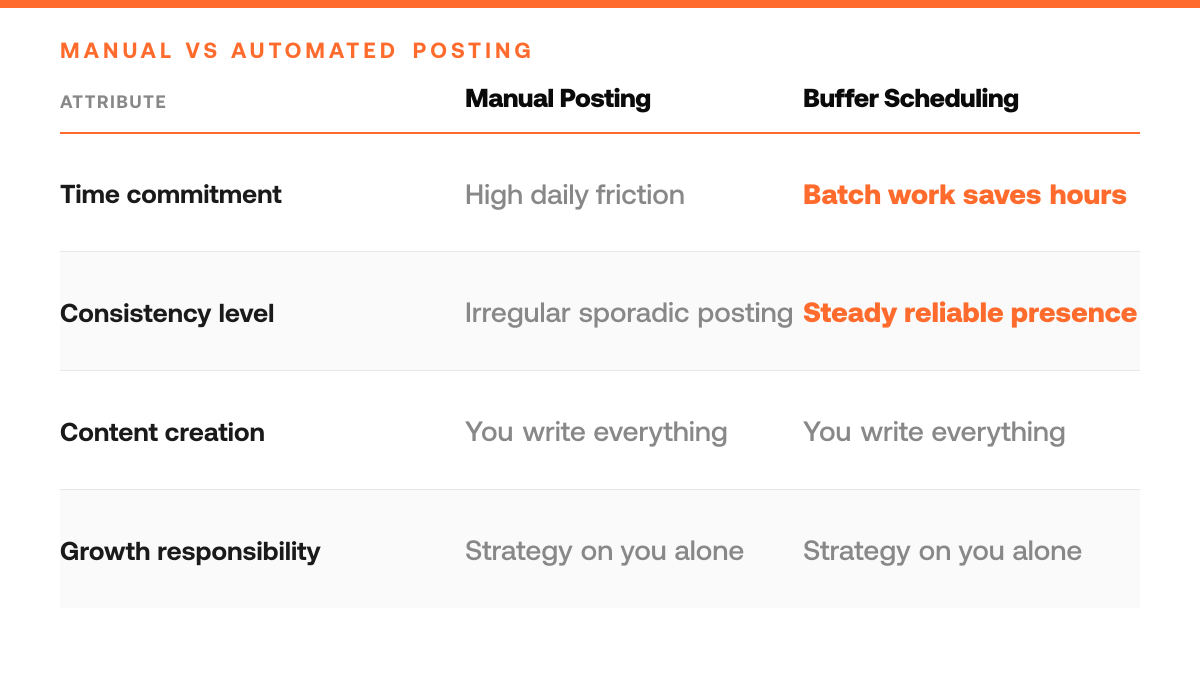
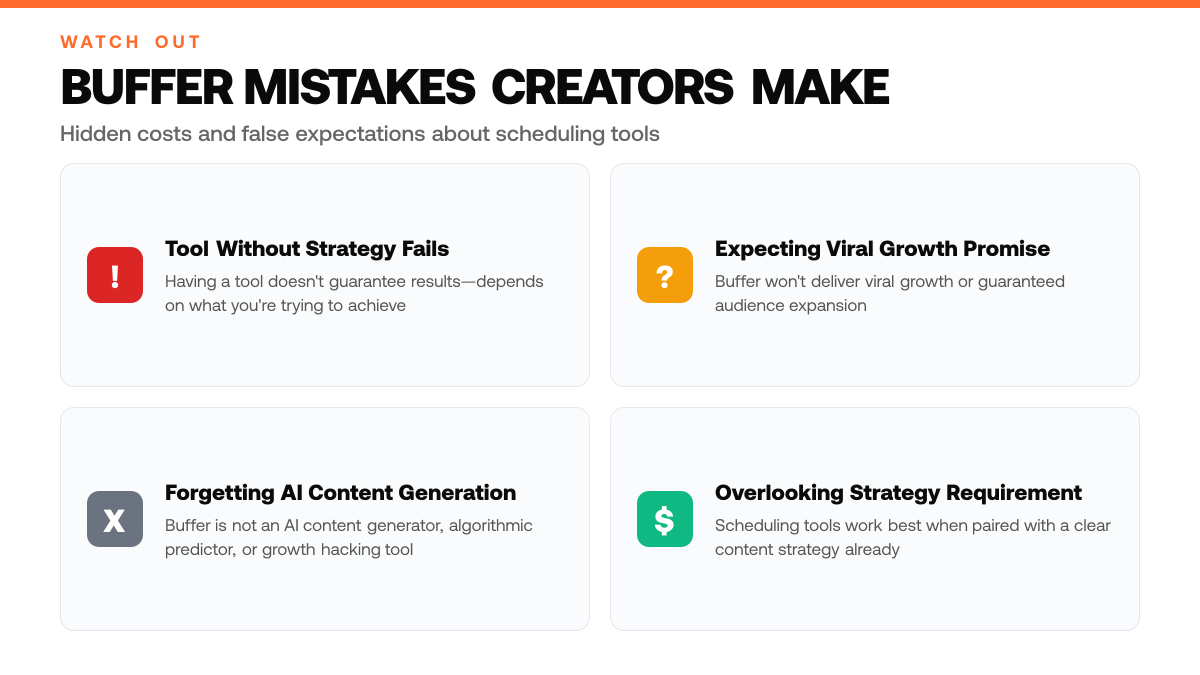
Buffer is a social media scheduling platform designed to help creators plan, schedule, and publish posts across multiple channels, primarily X, Instagram, Facebook, and LinkedIn. At its core, Buffer solves a specific problem: consistency. Rather than logging in multiple times daily to post, you write content in batches, schedule it for optimal times, and let the platform handle publication. This frees up hours each week that you'd otherwise spend on manual posting. Buffer also provides basic analytics to track engagement and reach, helping you see which posts resonate with your audience. However, Buffer is not an AI content generator, algorithmic predictor, or growth hacking tool, it's a scheduling and publishing layer that works best when you already know what you want to say.[3]
Why This Matters for Solo Creators Building on X
For solopreneurs focused on growing followers and impressions on X, time is the scarcest resource. Buffer's scheduling consistency directly addresses this: you can write multiple posts when inspiration strikes, schedule them across the week, and maintain a steady presence without daily friction. This matters because algorithmic platforms reward consistency, regular posting signals activity and keeps your content in front of followers. Understanding Buffer's limitations is equally important. If you're hoping for AI to write your posts, predict which topics will go viral, or automatically optimize your growth strategy, Buffer won't deliver that. You remain responsible for content quality, audience insight, and strategy. This clarity helps you decide whether Buffer fits your workflow or whether you need additional tools for content ideation and strategy.
The Broader Social Media Scheduling Landscape in 2026
Social media management tools have evolved significantly, with many now offering AI-driven content generation, predictive analytics, and advanced audience insights. Buffer occupies a focused position: it does scheduling well and stays out of your way. This positioning appeals to creators who prefer to own their voice and strategy but want operational efficiency. For monetization-focused creators on X, the question isn't whether Buffer is the most feature-rich tool available, it's whether reliable scheduling and basic analytics align with your growth priorities. If your bottleneck is consistency and time management, Buffer delivers. If your bottleneck is content strategy or audience discovery, you may need to supplement Buffer with other resources or workflows.[3]
Step-by-Step Process
1. Connect Your X Account to Buffer
Log into Buffer and authorize your X account through the platform's native integration. This grants Buffer permission to post on your behalf and access your account analytics. The connection is straightforward and requires only your X credentials and a confirmation step. Once linked, Buffer can pull your follower count, engagement metrics, and audience insights directly from X, which you'll use to assess posting performance later.[1]
2. Build Your Content Calendar with Posting Times
Create a content calendar within Buffer by drafting posts, selecting topics, and scheduling them across the week. Buffer allows you to set optimal posting times based on when your audience is most active on X. You can batch-create content in advance, reducing daily friction and ensuring consistent presence. The calendar view shows all scheduled posts at a glance, making it easy to maintain a coherent narrative and avoid posting gaps.[1]
3. Schedule Posts and Monitor Queue Status
Queue your drafted posts to Buffer's scheduler, which will publish them at your chosen times automatically. You don't need to manually post each tweet, Buffer handles the timing. Monitor the queue to ensure posts are queued correctly and adjust timing if needed. For solo creators, this automation removes the need to be online at specific hours, freeing time for content creation and audience engagement instead.
How This Works in Practice
Example 1: The Thread Writer's Batch Workflow
Picture a solo creator who spends Sunday afternoons writing 10 threads about audience-building tactics, personal finance lessons, or product launches. Instead of posting them live immediately, she drafts them in Buffer, schedules them across the week at consistent times, say, 9 a.m. and 4 p.m. on weekdays, and steps away. Over the next 5 days, her audience sees a steady cadence of polished content without her needing to interrupt her day job or deep work. Buffer handles the timing; she handles the thinking. The threads perform better because they're thoughtful, not reactive. She also notices that scheduling across different hours lets her test which times her followers engage most, a small data point that informs next week's schedule. This workflow turns content creation from a daily chore into a focused, batch process.
Buffer's Role: What It Does vs. What It Doesn't
| What Buffer Handles | What Buffer Doesn't Do |
|---|---|
| Post scheduling across multiple channels | AI content generation or writing |
| Content calendar views and planning | Algorithmic prediction of viral topics |
| Basic analytics to track engagement | Automated growth strategy optimization |
| Consistency through batch posting | Audience insight or strategy development |
Example 2: The Multi-Zone Creator's Consistency Challenge
Imagine a creator with an audience split across North America, Europe, and Asia. Posting at 9 a.m. her local time means missing peak hours in other regions. With Buffer, she schedules the same piece of content to go live at 8 a.m. EST, 1 p.m. GMT, and 9 p.m. JST, reaching each region when they're most active. Without a scheduling tool, she'd either post once and accept lower impressions in distant time zones, or wake up at odd hours to manually post. Buffer eliminates that friction. However, if her strategy depends on real-time engagement, responding to trending topics within minutes, or jumping into a conversation as it unfolds, Buffer's scheduling alone won't capture that moment. For pure consistency and reach across zones, it shines; for agility, she still needs to post live some days.
Where Buffer Fits and Where It Stops
Both examples show Buffer's core strength: turning sporadic posting into a reliable rhythm. Batch writing and timezone-aware scheduling are genuine time-savers that compound over months. But neither example ends with viral growth or a sudden audience surge, they end with consistency and reach. Buffer is a foundation, not a growth hack. It removes the friction of remembering to post and the guesswork of timing. What it doesn't do is write better content, predict what your audience wants, or replace the strategy of knowing who you're talking to and why.
Buffer Pre-Purchase Checklist
- List your target posting frequency on X and verify Buffer's scheduling limits match your content calendar needs
- Review Buffer's analytics dashboard to confirm it tracks the metrics you need to measure post performance
- Test Buffer's team collaboration features if you plan to work with co-creators or managers on content approval
- Compare Buffer's pricing tiers against your monthly budget and expected return on audience growth
Common Mistakes to Avoid
Mistake: Treating Buffer as a complete content strategy solution
Many creators assume that scheduling posts alone will grow their audience without investing in content quality or strategy. Buffer is a distribution tool, not a content creation engine. The mistake costs you engagement and stalled growth because scheduling mediocre content on a predictable calendar doesn't attract followers or spark conversation. Fix this by using Buffer only as the scheduling layer, pair it with a strong content strategy that focuses on value, authenticity, and audience insights before you ever hit 'schedule.'[2]
When to Choose Buffer vs. When You Need More
| Choose Buffer If | Look for Additional Tools If |
|---|---|
| You have a clear content strategy already | You need AI to help generate post ideas |
| Time savings and consistency are your priority | Predictive analytics are critical to your growth |
| You prefer to own your voice and messaging | You want automated optimization of your strategy |
| You manage multiple social channels efficiently | You need advanced audience insights beyond basic metrics |
Mistake: Relying on scheduling without active community engagement
Creators often set up Buffer to post on autopilot and then disappear, expecting the algorithm to do the heavy lifting. This approach ignores the reality that X rewards creators who show up, reply to comments, and build genuine relationships. Your scheduled posts sit dormant while competitors who engage in real-time capture the conversation and followers. Shift your mindset: use Buffer to free up time for scheduling, then spend that saved time responding to replies, joining relevant threads, and building community.[2]
Mistake: Ignoring Buffer's analytics to refine what works
Many solo creators schedule content and never check performance metrics, missing the data that tells them which topics, formats, and posting times actually resonate. Without this feedback loop, you keep repeating what doesn't work and miss opportunities to double down on high-performing content. Review your analytics weekly, look at impressions, engagement rate, and click-through patterns, then adjust your content mix and posting schedule based on what the data reveals about your audience's preferences.[2]
Frequently Asked Questions
Is Buffer worth the cost for a solo creator on X?
Buffer is worth it if you value reclaiming time spent on scheduling and analytics. It's not a growth guarantee, it's a time-saver that lets you batch-create content and track what resonates, so you can spend energy on what actually moves the needle. For creators juggling multiple projects, that efficiency often justifies the subscription. However, if you're posting sporadically or have minimal audience, the ROI may not materialize quickly.
How does Buffer compare to posting directly on X without a scheduling tool?
Direct posting on X is free and immediate, but it forces you to be present at publish time and offers limited analytics. Buffer lets you plan content in batches, publish on your optimal posting schedule, and review performance data that X's native interface doesn't surface as clearly. The trade-off is a monthly fee and the learning curve of a new platform. For creators serious about consistency and data-driven iteration, Buffer's overhead usually pays for itself.
Can I use Buffer alongside X's native scheduling features?
Yes, you can use both, though most creators choose one primary tool to avoid confusion. X's native scheduling is built-in and free, making it a valid option for basic planning. Buffer adds deeper analytics, team collaboration, and multi-platform scheduling if you post elsewhere. The decision depends on whether you need those extras or prefer simplicity. Buffer doesn't replace X's native tools, it complements them for creators who want more control and insight.
Start your 7-day trial
Grow on X without sounding like everyone else. A purpose-built platform learns from your top posts and the leading voices in your niche, then drafts content in your voice. You edit, approve, and ship.
Start free trialSources
Read next
- 5 X Premium Features Worth the Cost (Honest Review) - 5 X Premium Features Worth the Cost (Honest Review). A practical guide to what works, what to skip, and how to get started.
- Is OpenTweet Worth It in 2026? An Honest Review - Is OpenTweet Worth It in 2026? An Honest Review. A practical guide to what works, what to skip, and how to get started.
- Is Sprout Social Worth It in 2026? An Honest Review - Is Sprout Social a fit for solo creators on X? Review its analytics, scheduling, learning curve, and cost trade-offs before choosing your workflow.