
The short version
X does not show who unfollowed you on Twitter. It tells you about new followers, but nothing when one leaves. To find out who unfollowed you on X, you need your follower list from before and from now, then compare them.
Most people only need the count. A free follower tracker shows on which day you lost followers and how many. That tells you if a post, a topic change or a bot cleanup caused it.
- 0
- Unfollow alerts from X
- ~11%
- Of follows gone in 51 days (2010 study)
- 2x
- One-way follows break vs mutual
- $0.010
- X API price per follower an app reads
You check your profile and the number is lower than yesterday. The first question is always who. This page shows the ways to find out, what each one costs you, and the one that can get your account in trouble. Then the more useful part: why people unfollow, how many unfollows are normal, and when to worry. I checked every X detail on October 25, 2026.
Does X show who unfollowed you?
No. X has no unfollower list and no unfollow notification. X Help says “X sends you a notification when someone new follows you” (New user FAQ). There is no matching line for people who leave.
Your Followers list only shows who follows you right now. Once someone leaves, they are simply gone from it. X Help names three reasons a follower can vanish: the account “was hidden for spam activity, unfollowed you, or deactivated their account” (common following issues). So a missing name is not always a person who chose to leave.
How to find out who unfollowed you on X
Every method works the same way: compare a saved list of followers with today’s list. They differ in who saves the list and what it costs you.
| Method | Names who left? | Cost | Risk to your account |
|---|---|---|---|
| Check one profile for “Follows you” | One person at a time | Free | None |
| Compare two X data archives | Yes | Free, but slow | None |
| ClimbX follower tracker | No, the count and the day | Free, no login | None |
| Unfollower app with X sign-in | Yes | Often paid | Depends on its access |
| Your own X developer app | Yes | Pay per follower read | None if read-only |
Archive contents from X Help; API prices from X API pricing, checked October 25, 2026.
1. Check one person
Wondering about one specific person? Open their profile. If they follow you, X shows a small “Follows you” label next to their handle. No label means they don’t follow you anymore, or never did. This is the fastest check, and the only one that needs no tools.
2. Compare two X data archives
X lets you download your data, and the archive includes “a list of your followers” (X Help). Download one today and one later. Anyone missing from the second list left, was suspended or deleted their account.
- 1
Request your archive
Settings and privacy, Account, Your X data. Confirm the code X sends, then select Request data. - 2
Wait for the email
X emails you and sends a push notification when the .zip file is ready. - 3
Repeat in a week or a month
Keep the first file so you have something to compare against. - 4
Compare the two lists
Open the follower list in each archive. Paste both into a spreadsheet and look for accounts that are only in the old one.
It works, and it costs nothing. It is also slow and fiddly. Most people try it once and stop.
3. Track the count with the free follower tracker
If you want to know when you lose followers, not who, use the ClimbX Twitter follower tracker. Type a handle. It saves that day’s follower count and shows it next to every count saved before.
- 1Type your handleOr any public account
- 2It saves today’s countOnce per account per day
- 3Come back laterSee the change and a chart of every saved day
What it does and doesn’t do:
It does
- Save the follower count once a day, each time anyone checks the account
- Show the change since the last saved day
- Chart every saved count, so you see the day a drop landed
- Work for any public account, without your X login
It does not
- Save the list of followers, so it cannot name who left
- Fill in the past: history starts the first day anyone checked
- Guess the days nobody checked. They stay empty
- Send alerts. You check it when you want a new data point
Bookmark your result page and check it every few days. Some accounts ClimbX already follows for its own research get saved more often, so they may have a longer history.
4. Use an unfollower app
Apps like Circleboom save your follower list for you and show who left. Circleboom asks you to sign in with X, then lists unfollowers from the last day by default, with weekly or monthly email alerts (Circleboom). Its pricing page says the feature only works for accounts with up to 25,000 followers (plans and pricing).
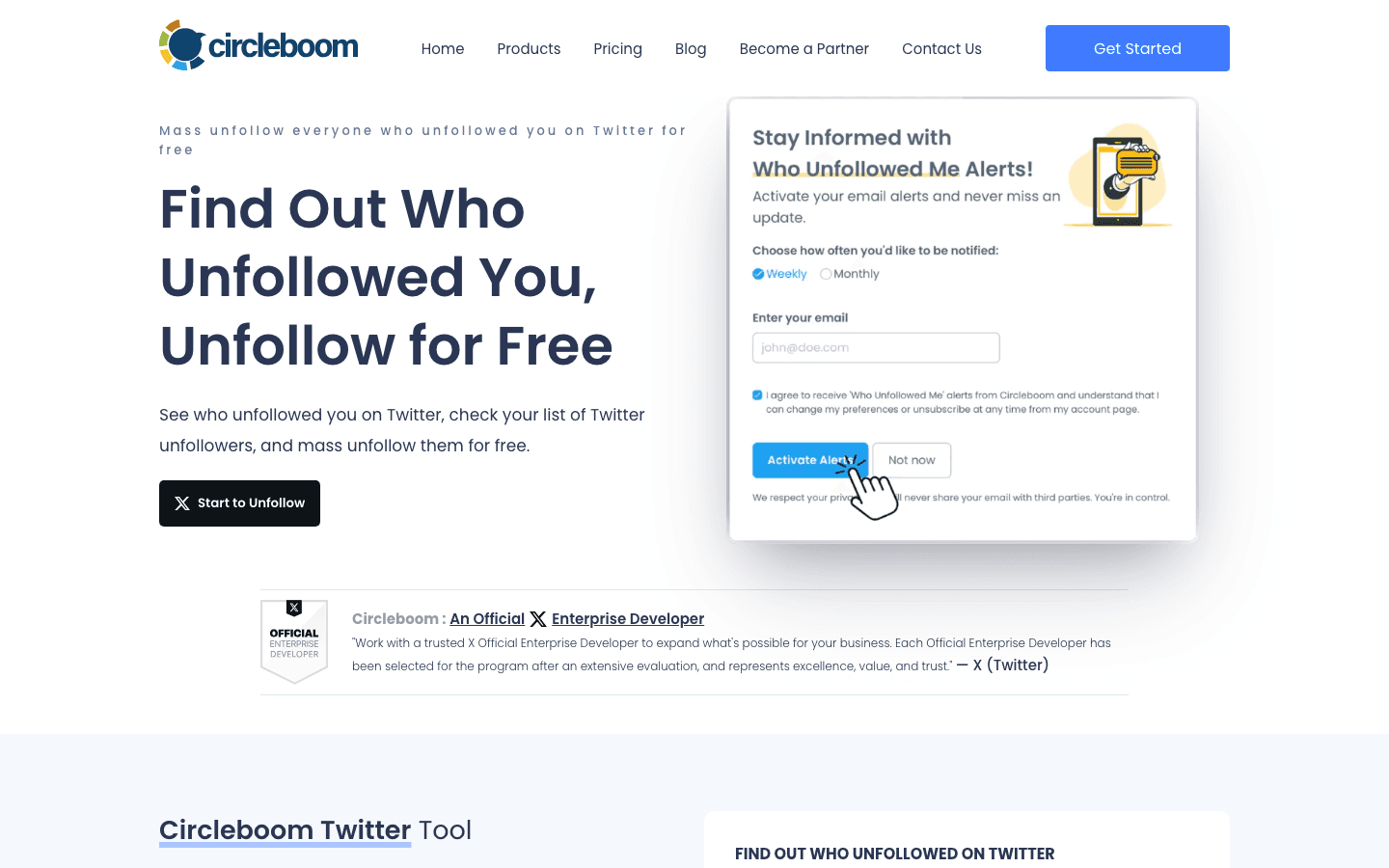
There is a reason these apps cost money or have limits. X charges apps $0.010 for every follower they read (X API pricing). At that list price, one full read of a 2,000-follower list costs an app about $20. Doing it every day adds up fast, which is why most unfollower apps charge or cap account size.
5. Build it yourself
If you code, you can pull your own follower list through your own X developer app. X prices these “owned reads” of your own data at $0.001 per resource, ten times cheaper than the normal rate (X API pricing). Save the list each day and compare. For most people, this is more work than the answer is worth.
The risk with unfollower apps
A read-only unfollower app is low risk. The trouble starts when the app can also act for you.
When you connect an app, X shows what it asks for. With read access it can see “people who follow you and people you follow.” With write access it can “follow and unfollow people for you” (X Help: third-party apps). Many unfollower apps sell exactly that: unfollow everyone who unfollowed you, in bulk.
X’s automation rules say you may not “follow or unfollow X accounts in a bulk, aggressive, or indiscriminate manner.” They also say “you are ultimately responsible for the actions taken with your account, or by applications associated with your account.” If an app breaks the rules, your account takes the hit. X Help also names connected apps as a cause of repeat account locks. Our guide on why X locks accounts covers what happens then.
Before you connect an unfollower app
- It sends you to an x.com page to authorize. It never asks for your password.
- It only asks to read, not to follow or unfollow for you.
- You won’t use any “mass unfollow” or “unfollow back” button.
- You check Settings and privacy, Apps and sessions, and revoke it when you are done.
Why people unfollow you on X
People unfollow when your posts stop being worth the space in their feed. The best data on this is old, but it is the only large study of real unfollows.
Researchers at KAIST took daily snapshots of 1.2 million Korean-speaking Twitter users for 51 days in 2010 and interviewed 22 of them (Kwak, Chun and Moon, CHI 2011). Here is what they found:
| Reason | What the study found |
|---|---|
| Too many posts at once | 20 of 22 people had unfollowed someone for posting a lot in a short time. The top reason by far |
| Topics they didn’t care about | 11 of 22 people, for 14 accounts |
| Dull details of daily life | 8 of 22 people, for 11 accounts |
| Politics | 6 of 22 people, for 8 accounts |
| Auto-posts from apps | 4 people unfollowed over automatic check-in posts from Foursquare |
A follow-up study by the same team found one more thing (Kwak, Moon and Lee, ICWSM 2012). People are less likely to unfollow accounts that acknowledge them, even when the follow is mostly one-way. In the authors’ words: “people are more of a receiver than a giver.”
How many unfollows are normal?
Some unfollows every week are normal, even on an account that grows. The same 2010 study found that about 11% of follows were gone within 51 days. It also showed which follows break most:
- They follow you, you follow them5.3%
- Any follow, picked at random11.4%
- They follow you, you don’t follow back12.3%
- The other side already unfollowed23.5%
Two things stand out. Mutual follows break about half as often as one-way follows. And once one side unfollows, the other side is the most likely to leave next. The study also found newer follows break more often than old ones. So expect people who followed you this week to be the first to go.
Our own data says the same about daily dips. ClimbX logs connected accounts’ follower counts once a day. In early October 2026, 17 to 23% of accounts with 100+ followers ended a normal day with fewer followers than the day before. Most of those dips were tiny. Why did I lose followers on X has the full chart. My own account dips by a few followers now and then too, while still growing week to week.
When to worry about unfollows
Worry about a trend, not a day. One bad day is usually a bot cleanup. A slide that lasts weeks is usually your content.
| What you see | Most likely cause | What to do |
|---|---|---|
| A drop on one day, then normal again | X removed spam or suspended accounts | Nothing. They weren’t reading you anyway |
| Friends lost followers the same day | A platform-wide cleanup | Nothing. Check again in a week |
| A slow slide over two or more weeks | Real people leaving | Look at what you posted just before it started |
| A slide after you changed topics | Followers came for the old topic | Decide if the new audience is worth it |
| Losses plus a sudden drop in views | Possibly a limit on your account | Run the shadowban checker |
To tell these apart you need the count over time. That is what the follower tracker is for. Check it on the day you notice a drop, then a few days later. If views fell too, run the Twitter shadowban checker to see if people can still find your posts.
How to keep the followers you have
Use the reasons people leave as a checklist. Each one has a simple fix.
- 1
Stay on the topic people followed you for
Off-topic posts were the second biggest reason in the study. A side topic now and then is fine. A full switch costs followers. - 2
Space out your posts
Don’t post ten things in an hour. Spread the same posts across the day instead. - 3
Reply to the people who reply to you
People are less likely to unfollow accounts that acknowledge them. Answering their replies is the simplest way to do that. - 4
Give something in every post
A number, a lesson, a question people can answer. “Had coffee” posts were a named reason to unfollow. - 5
Remove obvious bots yourself
They will be removed in the next cleanup anyway. See how to remove followers on X.
Frequently asked questions
Can you see who unfollowed you on Twitter?
Not inside X. X sends a notification when someone new follows you, but nothing when someone leaves, and it has no list of past followers. To name who left, you need a copy of your follower list from before and one from now, either from X’s data archive or from an app that saves it for you.
Does X notify you when someone unfollows you?
No. X Help describes notifications for new followers only. A study of Twitter unfollows even names the missing notification as one reason unfollowing is so common: it is one click and the other person never hears about it.
Is it safe to use a “who unfollowed me” app?
It can be, if you connect it through X’s own sign-in page and only give it read access. Never type your X password into the app. Avoid apps that also mass unfollow for you: X’s automation rules ban bulk unfollowing, and you are responsible for what connected apps do with your account.
Why do people unfollow on Twitter?
In interviews from the biggest study of unfollows, the top reason was too many posts in a short time. Next came topics the reader did not care about and posts about the dull details of daily life. One-way follows broke about twice as often as mutual ones.
How many unfollows are normal?
Some every week, even on a growing account. In a 2010 study of 1.2 million Twitter users, about 11% of follows were gone within 51 days. In ClimbX’s own log, 17 to 23% of accounts ended a normal day with fewer followers than the day before. Worry about a slide that lasts weeks, not about a single day.
Can the ClimbX follower tracker show who unfollowed me?
No. It saves your follower count once a day, never the list of accounts, so it cannot name anyone. It shows when your count went up or down and by how much, which is what tells you if your posts are working.
Bottom line
X won’t tell you who unfollowed you. You can find out by comparing two data archives or with a read-only app. Skip any app that unfollows in bulk for you. For most people the count matters more than the names. Track it, and only act on a slide that lasts weeks.
See when you gain and lose followers.
Use the free follower tracker, then let ClimbX draft posts in your voice that give people a reason to stay. You approve every post. From $29/month, 7-day trial.
Read next
- Why Did I Lose Followers on X? You Probably Lost Bots, Not Fans - Dropped followers overnight? X removes bot and spam accounts in waves, usually without telling you. What is happening, what our own follower data shows, and how to check who actually left.
- How to Remove Followers on X (Including Bots) - Remove followers on X from the web or app, when to block or soft block instead, how to spot bot followers, and whether clearing them changes your reach.
Sources
- X Help: New user FAQ - X notifies you of new followers; no unfollow notification, checked October 25, 2026
- X Help: Common following issues - why a follower disappears, and the quality filter
- X Help: How to download your X archive - the archive includes a list of your followers
- X Help: Third-party apps and sessions - read vs write access, and how to revoke an app
- X Help: Automation rules - no bulk unfollowing; you are responsible for connected apps
- X API: Pay-per-usage pricing - $0.010 per follower read, $0.001 for owned reads, checked October 25, 2026
- Circleboom: Who unfollowed me on Twitter - X sign-in, daily unfollower list, weekly or monthly alerts
- Circleboom: Plans and pricing - unfollower tracking limited to accounts with up to 25,000 followers
- Kwak, Chun and Moon: Fragile online relationship (CHI 2011) - 1.2 million users, 51 days of snapshots, 22 interviews on why people unfollow
- Kwak, Moon and Lee: More of a receiver than a giver (ICWSM 2012) - people are less likely to unfollow accounts that acknowledge them
- github.com/xai-org/x-algorithm - author diversity lowers repeat posts from one author in a feed