The short version
Paste the full destination URL into the X composer, add a reason to open it, and review the post before publishing. X wraps links through t.co and counts a URL as 23 characters. Sharing a post link and editing your profile website are separate actions.
A link on X has two jobs: send the reader to the right page, and tell them honestly what they will find there. This guide covers how to share links on X, then a short check to run before you send people to a tutorial, feature page, or signup flow.
Choose the next step
| Your task | Start here |
|---|---|
| Share a website | Paste its URL into a post and explain the destination. |
| Share an existing post | Use the post’s Share control and copy its link. |
| Share your profile | Use the profile address for your current handle. |
| Add your business website | Edit the website field in your profile. |
Post a link with a clear reason to click
Copy the address from the page itself, paste it into the composer, and write the useful part of the post around it. X runs every link through t.co, so even a long URL counts as 23 characters in a post. You do not need another shortener just to lower that count.
Say what is behind the link. “The checklist we use before releasing a pricing change” tells a reader whether to click. “Check this out” makes them guess whether it matters.
Copy the right post or profile URL
For an existing post, use its Share control and copy the post link. That link points to that exact conversation. A profile link only points to the account, which does not help when someone needs the exact post you mean.
Check your current handle before you share a profile address. If you changed it recently, update website footers, email signatures, and launch documents that still use the old handle.
| Link type | What it points to | Typical mistake |
|---|---|---|
| Website URL | The page you want readers to use. | Linking to the homepage when the post promises a specific guide. |
| Post URL | One particular X post and its conversation. | Sharing the author’s profile instead of the post. |
| Profile URL | The account identified by its current handle. | Keeping an old handle in a website footer. |
| Profile website field | The external destination chosen in your profile. | Leaving an expired campaign or private preview link. |
Check a link preview as a separate part of the post
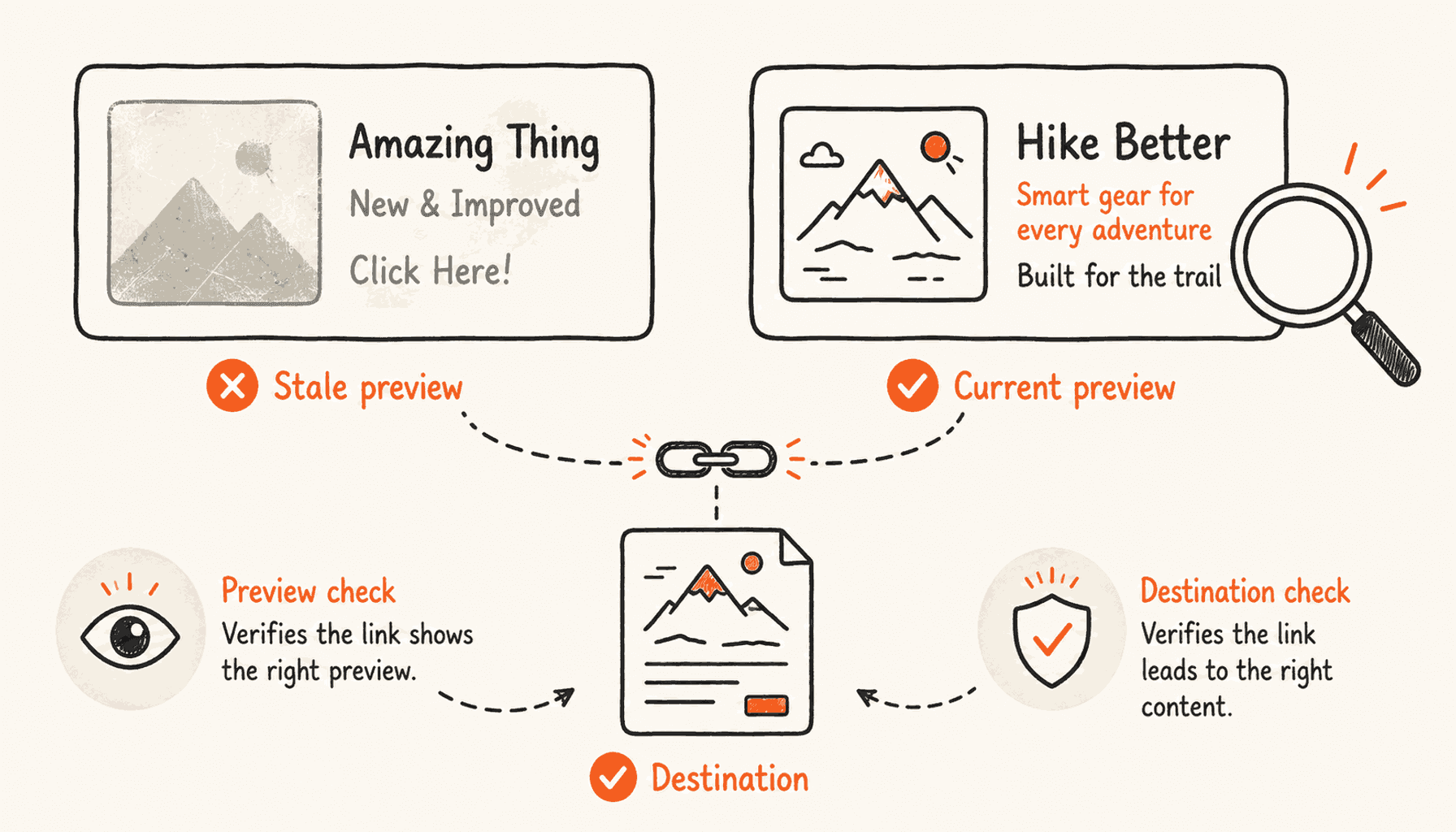
Before you post an important announcement, check the link preview if one shows up. Does its headline describe the page you are sending readers to? Does the image still show an old product name or price?
If the card is missing or out of date, first open the page directly and check that it loads. If you own the website, check its title, description, and social-card metadata. Previews can be cached. Rewording the post again and again will not fix a metadata problem on the website.
Make the post make sense without the card. A preview helps, but the text should still explain the page in case an app shows it differently.
If the preview looks wrong, isolate the problem
Check two things on their own: does the link open the right page, and does the card look right? If the URL opens the wrong page, fix that before you look at the image. If the page is right but the card is old, check the website’s social metadata and any recent page changes.
For example, a launch post might link to a new feature page while its preview still shows last month’s offer. The text and the page can both be right while the preview misleads the reader. Fix the website metadata, then check the result again. Editing the post text will not update a cached card.
If you do not own the page, you may not be able to fix its preview. Explain the page in your post so it stands on its own. Do not promise that a certain card will show for every reader. What matters is a clear link that works.
| What failed | Where to investigate |
|---|---|
| Wrong destination | The exact URL and redirects. |
| Works only for you | The page’s login and sharing permissions. |
| Wrong headline or image | The destination’s metadata and cached preview. |
| Readers do not understand the offer | The promise in the post and the landing page’s first screen. |
Run a small destination check before a launch
Open the final URL in a private browser window and on a phone. This catches a common mistake: a link that only works because you are already logged into your own account.
If the page needs a login on purpose, say so in the post. Also check that redirects still land on the page you meant. A working homepage may be the wrong page for a feature announcement.
- Does the page answer the promise made in the post?
- Can the intended reader access it?
- Does the primary action work at phone size?
- Are any tracking parameters free of personal or confidential data?
Measure the result you actually wanted
Decide what result you want before you choose between the main post and a reply for the link. For a tutorial, reading and follow-up questions may matter most. For a signup page, real signups tell you more than impressions.
Try a few similar posts and note the topic, audience, and page for each. One post that did unusually well does not prove a rule about links. The content, timing, and audience changed too.
A t.co link does not protect anything. X’s shortener does not make a document private. Set the page’s permissions before you share it.
If you share a setup guide, track a simple chain: the post promised a task, the page explained it, and the reader either did the next step or left. If you track the link, use the same campaign labels each time and keep personal data out of them. Count a visit, a trial start, and real product use as three different things.
Compare similar topics over the same stretch of time. If one post linked to a tutorial and another to a generic signup page, the link placement is not the only thing that changed. Write that down before you pick a rule for the next batch.
Frequently asked questions
How many characters does a URL use on X?
X says URLs count as 23 characters, regardless of their original length.
Do I need a third-party URL shortener?
Not to reduce the X character count. X shortens links automatically through t.co.
Does a short link make a private document safe to share?
No. Access depends on the destination’s permissions, not on how short its URL looks.
Write a post that gives the link a reason to exist
Use ClimbX to work out the point and the takeaway before you add the link. It drafts the post in your voice and you edit it. ClimbX does not schedule posts with links, so you post those yourself with the Post button.
Read next
- How to Write a Thread on X That People Finish - Write an X thread with a clear promise, useful sequence, credible evidence, readable pacing and a strong ending, plus structures, editing rules and examples.
- Why Your Build-in-Public Posts Get Likes but No Customers - Diagnose why X followers and build-in-public likes are not producing SaaS customers, then repair the audience, message, proof, offer, and conversion path.
Sources
- How to post a link - Posting URLs and their character count.
- X’s URL shortener - Automatic t.co handling and destination access.
- Find a post URL - Copying a link to an individual post.