
The short version
Build your weekly X content calendar from work you can explain: a customer question, a product decision, a useful walkthrough, and an honest follow-up. Choose the strongest material, give each post a job, and leave space for replies. A calendar should help you select and finish useful posts, not require an announcement every day.
Knowing how to schedule a post does not solve the Monday morning question: what is worth saying this week? A list of formats helps, but you still need a connection between your work, the reader’s problem, and the product you want people to try.
The example below follows a fictional founder building a client-reporting tool for agencies. The events and posts are illustrative, not ClimbX results or a tested optimal cadence. Use the reasoning to choose your own material rather than copying the scenario.
An illustrative week, including space to listen
| Day | Material and next action |
|---|---|
| Monday | Explain a reporting problem from a customer conversation. |
| Tuesday | Answer replies and improve the help article; no queued post required. |
| Wednesday | Show a product decision that addresses part of the problem. |
| Thursday | Keep space for a real question or follow-up. |
| Friday | Share a useful walkthrough with a relevant trial invitation. |
Collect evidence before choosing days
Keep a small idea inbox during normal work. Record the problem, what happened, what you learned, and what you can safely show. A vague note such as “onboarding post” is hard to draft from. “Agency owner could not tell whether the report included unpaid invoices” gives you a specific misunderstanding to explain.
For our fictional reporting product, the source material is one customer question about totals, a decision to label the reporting period more clearly, and a short walkthrough of the corrected flow. That supports several different reader tasks without claiming the change improved retention or saved a measured number of hours.
Before using a customer story, remove identifying details and get permission where needed. If you cannot share the real artifact, explain the general workflow and label any recreated demonstration. Do not turn a private conversation into an invented public testimonial.
Turn one product week into three distinct posts
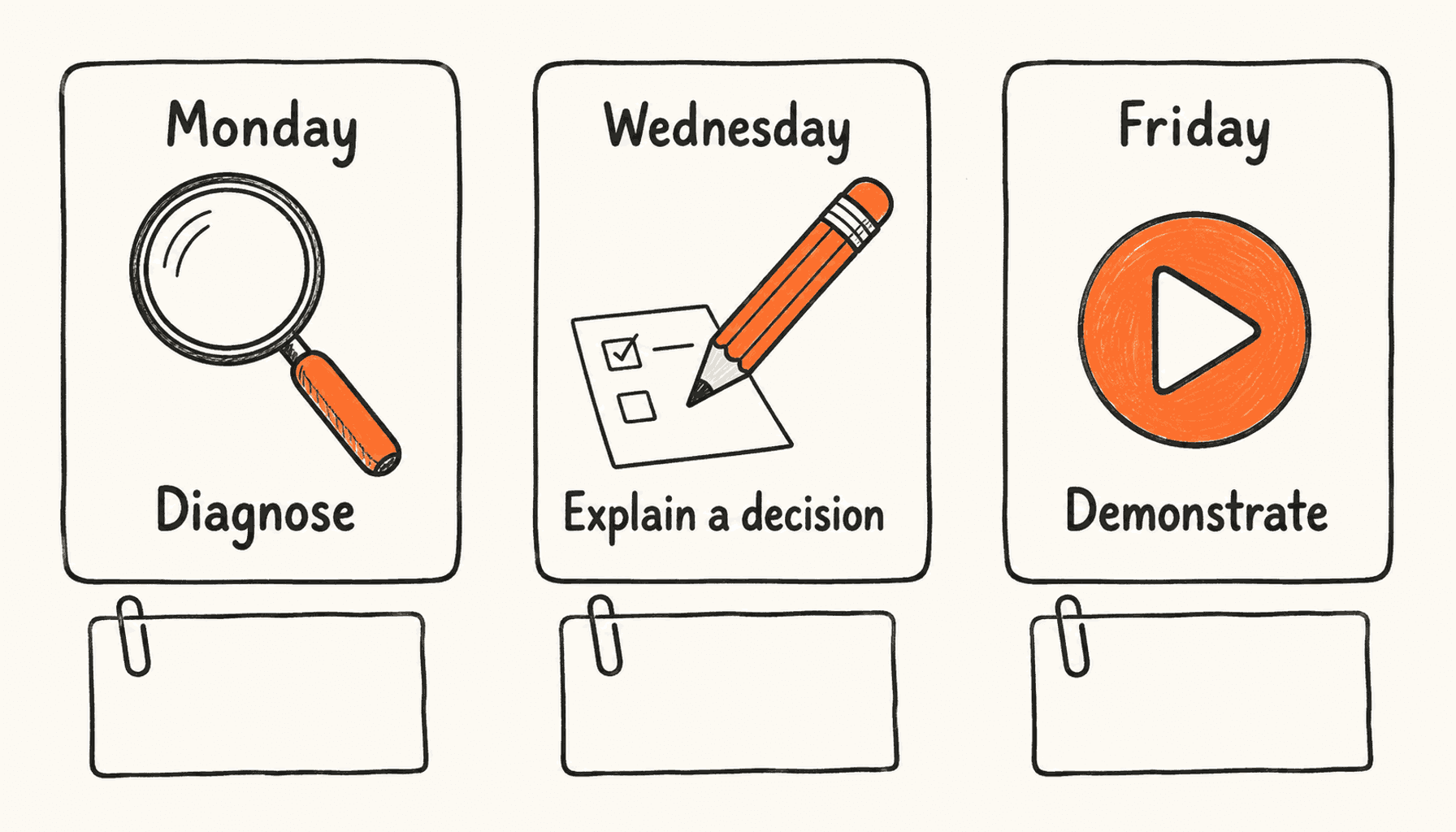
Monday’s post explains why two reports can show different totals when their date windows differ. It helps an agency owner diagnose the issue even if they never use the product. The next step can be a genuine question about how they check their reporting period.
Wednesday’s post explains why the founder moved the date range next to the total. Show the relevant part of the interface if it is safe to share. Discuss the tradeoff: clearer context may take space from another control. The post’s job is to demonstrate judgment, rather than repeat Monday’s problem statement.
Friday’s walkthrough shows how an agency owner can prepare a report with an explicit period and check the totals before sending it. Link to the product only if the demonstrated workflow is available. The invitation should say who the product is for and what they can try.
These are three useful units: diagnose, understand a decision, and complete a task. Changing the opening sentence of the same announcement three times would not add the same value.
| Post | Evidence needed | Reader benefit |
|---|---|---|
| Reporting explanation | A correct example with clearly stated dates. | Understand why totals differ. |
| Interface decision | The actual change and honest tradeoff. | See how the founder solves a familiar problem. |
| Walkthrough | An available flow and working destination link. | Complete the task or evaluate the product. |
Use a small calendar you will maintain
A useful calendar stores more than the publication time. Include the audience, source material, intended outcome, and readiness state. Keep it short enough to review before a post goes live. A spreadsheet or document can handle the planning; a scheduler handles delivery.
For Wednesday’s example, the entry might say: agency owners; date-range decision; current interface image; help readers evaluate the approach; draft awaiting image review. That makes the remaining work visible. A green calendar slot alone would not tell you the screenshot is out of date.
- Idea: the source exists, but the post has not been written.
- Draft: the explanation is written and still needs review.
- Ready: claims, media, links, and audience relevance have been checked.
- Scheduled: the account, date, time, and timezone are confirmed.
- Reviewed: the live post and useful responses have been checked.
Make the quiet-week version smaller
If the feature slips, remove the planned demonstration until the flow is available. You can still explain the customer problem or an established method for solving it. A calendar should not pressure you into announcing unfinished work as released.
If there are no fresh customer calls, return to a recurring question you can answer accurately. Revisit an older post only when you have a new example, clearer explanation, or substantive correction. An unchanged repost may have a purpose, but it should not masquerade as a new finding.
A quiet week might contain one useful explanation and time to answer the people it reaches. That is a legitimate plan. Add another post when you have something that earns its place, not because the table has an empty cell.
Choose the format after you know the point
Use a short post for one complete observation. Use a thread when the reader needs an ordered explanation that cannot fit clearly into one post. Use an image when the artifact helps the reader understand or verify something. A decorative picture does not supply missing evidence.
The existing founder post-ideas guide covers reusable formats and a broad weekly mix. This calendar adds a worked sequence from one real project, readiness checks, and fallback decisions. Use the format guide when the idea is clear but the presentation is not.
Review, then schedule the finished material
Separate drafting from the final check. Read each post as someone who does not know your product. If the reader needs a missing definition or an unexplained screenshot, fix that before scheduling. Also compare neighboring posts so the week does not repeat the same point.
ClimbX connects relevant inspiration, drafting in your voice, and a calendar. Bring your source notes into the writing process, check the output against those notes, and schedule the version you approve. The tool can organize the workflow; it cannot make an unverified customer outcome true.
- Check that the claim matches the source and that examples are labeled honestly.
- Inspect every media file for private information and outdated interface details.
- Open the destination link and confirm the reader can take the promised next step.
- Confirm the publishing account, date, time, and timezone.
- Leave time to read replies and revisit queued posts if the product situation changes.
Decide what to repeat from useful responses
At the end of the week, compare each post with its intended job. The explanatory post may attract a useful question. The interface decision may start a conversation with an agency owner. The walkthrough may lead to a trial. Record those signals separately from views.
Where you have analytics, use tagged links and your signup data to investigate product interest. Attribution is incomplete: someone may read a post and return directly later. A quiet comment section does not prove there was no business value, and a popular post does not prove it acquired customers.
For the next week, follow the strongest unresolved reader question. If people understand the date range but struggle to explain refunds, that is a specific next topic. Preserve the useful teaching approach and supply new evidence. Do not keep rewriting the date-range announcement because one version received attention.
Frequently asked questions
How often should a SaaS founder post on X?
Choose a pace you can sustain with useful source material and time for replies. The three-post example here is a planning illustration, not a proven best frequency. A smaller week is reasonable when there is less to share.
How far ahead should I plan my X content calendar?
Start with a week you can review easily. Schedule finished, durable material and recheck anything tied to a release or changing fact. Leave room for actual questions and product updates.
What should I post when I have no launch news?
Explain a recurring customer problem, demonstrate an existing workflow, or revisit a decision with new evidence. Skip a slot if you cannot add something useful.
Do I need a paid scheduler to make a weekly content calendar?
No. You can select topics and track readiness in a document or spreadsheet. A scheduling tool becomes useful when you want the drafts and delivery calendar connected to your writing workflow.
Turn this week’s work into your next useful posts.
Use ClimbX to research relevant ideas, draft in your voice, and schedule the posts you have reviewed. Start with one real customer question or product decision.
Read next
- What to Post on X as a Startup Founder: 50 Practical Ideas - Fifty useful X post ideas for startup and SaaS founders, organized by proof, customer insight, product decisions, lessons, launches, and conversation goals.
- How to Schedule Posts and Threads on X - Schedule X posts and threads without losing your voice. Compare native scheduling with third-party queues and build a sustainable, human-reviewed cadence.
- Founder or Company X Account: Where Should You Build Your Audience? - Choose where to build your X audience with founder and company account examples, clear publishing roles, and a practical review plan.
Sources
- ClimbX founder post-ideas guide - Related guidance on selecting formats and collecting evidence from founder work.